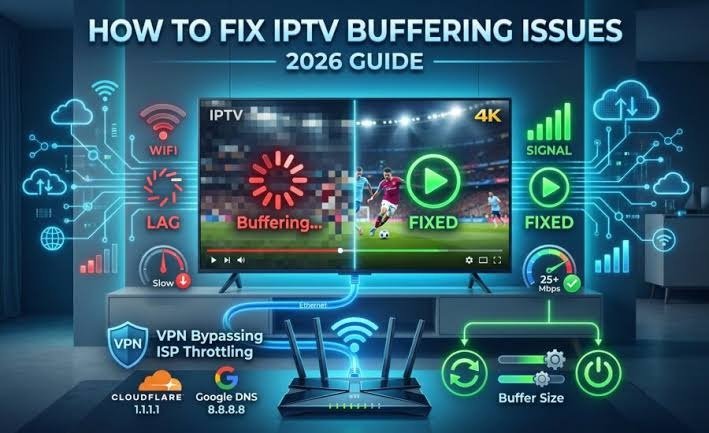
Finding the best IPTV without buffering is not simply about choosing a service with thousands of channels or a low monthly price. A smooth IPTV experience depends on several things working together, including the IPTV service, your internet connection, Wi-Fi network, streaming device, and IPTV player.
If your IPTV keeps freezing, loading slowly, or showing a spinning circle during live TV, the problem may not always be the IPTV provider. A weak Wi-Fi signal, an overloaded home network, unsuitable player settings, or an unstable connection can all cause buffering. Current IPTV troubleshooting guides consistently recommend checking these factors before assuming the service itself is responsible.
This guide explains what IPTV buffering is, what causes it, how to test an IPTV service, and what to look for when choosing a fast IPTV or stable IPTV service.
What Does IPTV Without Buffering Mean?
When people search for no buffering IPTV or IPTV without buffering, they usually want a service that plays live channels, movies, and other streams without frequent pauses or freezing.
However, no IPTV provider can realistically control every part of your streaming connection.
For example, even a good IPTV service can experience playback problems if:
- Your Wi-Fi signal is weak
- Your internet connection is unstable
- Too many devices are using your network
- Your streaming device is overloaded
- Your IPTV player has unsuitable settings
- A particular stream is temporarily unavailable
- The provider has an issue with a specific source or server
This is why the better way to evaluate the best IPTV without buffering is to look for consistent performance rather than believing a simple “zero buffering” claim.
A stable connection is often more important than the maximum internet speed advertised by your ISP. Some current troubleshooting guides specifically recommend testing the connection on the device you actually use for IPTV rather than relying on a speed test performed on a nearby phone.
What Causes IPTV Buffering?
IPTV buffering occurs when the device cannot receive and process video data quickly and consistently enough for continuous playback.
There can be several causes.
1. Unstable Internet Connection
Your internet plan may advertise a high download speed, but that does not automatically mean your IPTV connection will be stable.
Temporary drops, packet loss, congestion, or inconsistent performance can interrupt a live stream.
For that reason, test your internet connection directly from the device you use for IPTV whenever possible.
2. Weak Wi-Fi Signal
Wi-Fi is one of the first things worth checking when IPTV starts buffering.
A television or Fire TV Stick located far away from the router may receive a much weaker signal than a phone sitting next to the router.
If possible, try:
- Moving the router closer to the streaming device
- Using a 5 GHz Wi-Fi network when appropriate
- Reducing interference from other devices
- Connecting the streaming device through Ethernet
Several current IPTV troubleshooting resources recommend Ethernet as a useful diagnostic because it can help determine whether Wi-Fi is responsible for the problem.
3. Too Many Devices Using the Network
If several people are simultaneously watching videos, downloading large files, playing online games, or using video calls, your IPTV device may have less available bandwidth.
Try testing IPTV when fewer devices are using the connection.
If the stream becomes stable, the issue may be your local network rather than the IPTV subscription.
4. IPTV Provider or Stream Problems
Sometimes the problem really is on the provider’s side.
For example, if:
- One particular channel repeatedly buffers
- Other channels work normally
- The same channel buffers on different devices
- The problem happens at specific times
then the individual stream or provider infrastructure may need investigation.
Current troubleshooting guides recommend comparing different channels and devices to isolate whether the problem follows the stream, device, network, or service.
5. IPTV Player Problems
The IPTV service and IPTV player are not the same thing.
Your subscription provides access to the streams, while the player is the application used to play them.
A poorly configured or unsuitable player can create playback problems even when the underlying stream is working properly.
Depending on the device and application, available settings may include buffer size, hardware/software decoding, and video quality controls.
How to Choose the Best IPTV Without Buffering
Instead of choosing an IPTV service because it makes the biggest promises, look at several practical factors.
1. Test Before Making a Long-Term Decision
A trial can be useful because it allows you to test the service on your own device and internet connection.
During the test, don’t watch only one channel for five minutes.
Try different types of content and different times of day.
2. Check Channel Loading Speed
A fast IPTV experience should not only mean that a video eventually plays.
Pay attention to how quickly channels load when you switch between them.
If channel changes repeatedly take a long time, the issue may be related to the provider, player, device, or connection.
3. Test During Different Times
A service can perform well during quiet hours and behave differently when many people are watching live content.
Try testing:
- Morning
- Afternoon
- Evening
- During popular live events
This gives you a better understanding of real-world performance.
4. Test Multiple Channels
Don’t judge an IPTV service from one channel.
Try:
- News channels
- Entertainment
- Movies
- Sports
- International channels
- HD/FHD streams where available
If only one or two channels have problems while everything else works normally, that does not necessarily mean the entire IPTV service is unstable.
5. Check Device Compatibility
The same IPTV service can behave differently across different devices.
Before choosing a provider, make sure it supports the devices you actually use.
Common IPTV platforms include:
- Fire TV / Firestick
- Android TV
- Smart TVs
- Android phones and tablets
- iPhone and iPad
- Compatible IPTV players
The player you use can also affect playback, so testing your preferred setup is important.
How to Reduce IPTV Buffering
If your IPTV is buffering, try these steps before replacing your service.
Step 1: Restart Your Device
Completely close the IPTV application and restart your streaming device.
This is a simple first step and can resolve temporary playback problems.
Step 2: Restart Your Router
Restarting the router can help clear temporary network problems.
After restarting, allow the connection to become stable before testing IPTV again.
Step 3: Test Your Internet on the IPTV Device
Don’t rely only on a speed test from your smartphone.
Run the test on the same Firestick, Android TV box, Smart TV, or other device that you use for IPTV.
The connection available to the streaming device is what matters.
Step 4: Try Ethernet
If your device supports Ethernet, test the IPTV service with a wired connection.
If buffering disappears when you switch from Wi-Fi to Ethernet, your Wi-Fi environment may be the main problem.
Step 5: Test 5 GHz Wi-Fi
If Ethernet isn’t practical, try a 5 GHz Wi-Fi connection where your router and device support it.
The best option depends on your home layout and the distance between the router and streaming device.
Step 6: Try Another IPTV Player
If your subscription supports multiple compatible players, testing another player can help identify whether the application is contributing to the problem.
Step 7: Compare Different Channels
If only one channel buffers, test several others.
If everything works except one stream, the problem may be isolated to that source rather than your entire IPTV connection.
Fast IPTV vs Stable IPTV: What’s the Difference?
The terms fast IPTV and stable IPTV are often used together, but they describe slightly different things.
A fast IPTV experience usually refers to:
- Quick channel loading
- Responsive navigation
- Faster channel switching
- Shorter waiting times
A stable IPTV experience is more about:
- Consistent playback
- Fewer interruptions
- Reliable connections
- Consistent performance over time
Ideally, you want both.
A service that loads channels quickly but frequently freezes is not truly a good streaming experience.
Likewise, a service that eventually loads every channel but takes a long time to switch between them may not feel fast.
How to Tell Whether the Problem Is Your IPTV or Your Internet
This is one of the most useful tests you can perform.
Ask yourself four questions:
Does every channel buffer?
If yes, check your internet, Wi-Fi, device, and player first.
Does only one channel buffer?
If yes, the individual stream may be the problem.
Does it happen on every device?
If yes, your network or the IPTV service becomes more likely.
Does it happen only at certain times?
If yes, network congestion or provider-side capacity may be involved.
This simple comparison can save you from changing providers when the real problem is your home network.
What Should You Expect From a Reliable IPTV Service?
A reliable IPTV service should provide more than a large channel list.
Before choosing one, consider:
- Streaming consistency
- Channel loading performance
- Device compatibility
- Available setup instructions
- Customer support
- Trial availability
- EPG availability where applicable
- Clear subscription information
- Support for the IPTV player you intend to use
A large channel count looks impressive, but it does not automatically mean better streaming.
For most viewers, stable playback and easy setup are more valuable than an unnecessarily large list of channels they never watch.
Is Sonix IPTV Pro a Good Option for Stable Streaming?
If you’re considering Sonix IPTV Pro, the best approach is to evaluate the service based on your own setup rather than relying only on advertising claims.
Test it on the device you actually use, check different channels, and test the connection at different times.
This is particularly important if your main priority is a fast IPTV experience or stable live streaming.
Sonix IPTV Pro can also be evaluated based on the areas that matter to everyday IPTV users, including device compatibility, setup assistance, channel access, support, and overall streaming performance.
The goal should be simple: test the service in your own environment and decide based on actual performance.
Best IPTV Without Buffering: Final Thoughts
The best IPTV without buffering is not necessarily the provider making the biggest “zero buffering” promise.
A smooth IPTV experience comes from several factors working together:
- A reliable IPTV service
- Stable internet
- Good Wi-Fi or Ethernet
- A suitable streaming device
- A properly configured IPTV player
- Consistent stream sources
- Good troubleshooting when problems occur
If you’re looking for a no buffering IPTV experience, start by testing the connection and device you actually use. Then evaluate the provider by testing different channels and different times of day.
For people comparing IPTV services, fast IPTV, stable IPTV, and reliable IPTV should be judged by real-world performance rather than marketing claims.
And if you’re considering Sonix IPTV Pro, testing the service on your own setup is the best way to determine whether it delivers the streaming experience you’re looking for.